
This is the third post of the series that started with “Changes to My Network, Sponsored By XMPP”.
The Problem
In that article, nearly at the very end, I was pointing out that a solution was needed for the XMPP traffic on non-Web ports (TCP and UDP other than 80 and 443) to be routed from a cloud VPS to my home server.
I tried some NGINX configuration using its module streams, but it didn’t work, so I will post here how I ended up solving that using Linux’ –the kernel itself– packet filter rules through iptables.
I learned and adapted my solution from the content of this article by Ryan Welch.
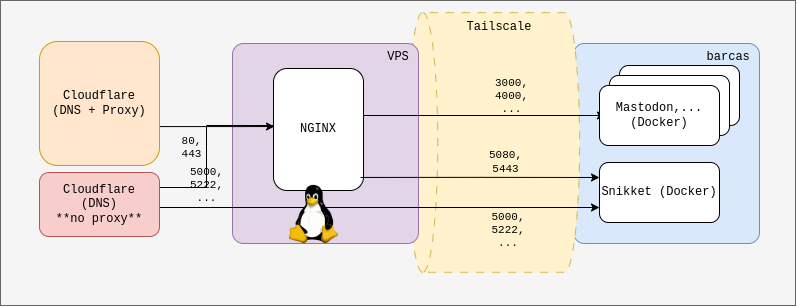
The goal
At the end of the post, though, I will also post how to configure NGINX to work with TCP and UDP general traffic, just in case we need it later, or maybe you want to try it and tell me what I did wrong.
Solution
As explained before, Linux (NOT GNU/Linux, but just “Linux”, the kernel) has network packet filtering capabilities built-in that can be configured to our needs.
To configure the VPS to do it, SSH into the machine and enable IP forwarding in the kernel:
sudo sysctl -w net.ipv4.ip_forward=1
This may or may not be persitent between boots, depending on your distribution. To be sure, uncomment the line net.ipv4.ip_forward=1 in /etc/sysctl.conf.
Then, you will be able to redirect ports and ranges with sentences like the following:
iptables -A PREROUTING -t nat -p tcp -i eth0 --dport 5222 -j DNAT --to-destination <Upstream VPN IP>:5222
iptables -A POSTROUTING -t nat -p tcp -d <Upstream VPN IP> --dport 5222 -j MASQUERADE
And, for ranges of ports:
iptables -A PREROUTING -t nat -p udp -i eth0 -m multiport --dports 49152:65535 -j DNAT --to-destination <Upstream VPN IP>:49152-65535
iptables -A POSTROUTING -t nat -p udp -d <Upstream VPN IP> -m multiport --dports 49152:65535 -j MASQUERADE
You’ll have to change the ports in this example, as well as putting your own remote IP address instead of the <Upstream VPN IP> placeholder.
Add all the forwarding rules corresponding to all the XMPP server ports, where <Upstream VPN IP> would be the Tailscale IP of my home server, the one we were calling potato in the previous article of the series):
iptables -A PREROUTING -t nat -p tcp -i eth0 --dport 5222 -j DNAT --to-destination <Upstream VPN IP>:5222
iptables -A POSTROUTING -t nat -p tcp -d <Upstream VPN IP> --dport 5222 -j MASQUERADE
iptables -A PREROUTING -t nat -p tcp -i eth0 --dport 5269 -j DNAT --to-destination <Upstream VPN IP>:5269
iptables -A POSTROUTING -t nat -p tcp -d <Upstream VPN IP> --dport 5269 -j MASQUERADE
iptables -A PREROUTING -t nat -p tcp -i eth0 --dport 5000 -j DNAT --to-destination <Upstream VPN IP>:5000
iptables -A POSTROUTING -t nat -p tcp -d <Upstream VPN IP> --dport 5000 -j MASQUERADE
iptables -A PREROUTING -t nat -p tcp -i eth0 --dport 3478 -j DNAT --to-destination <Upstream VPN IP>:3478
iptables -A POSTROUTING -t nat -p tcp -d <Upstream VPN IP> --dport 3478 -j MASQUERADE
iptables -A PREROUTING -t nat -p tcp -i eth0 --dport 3479 -j DNAT --to-destination <Upstream VPN IP>:3479
iptables -A POSTROUTING -t nat -p tcp -d <Upstream VPN IP> --dport 3479 -j MASQUERADE
iptables -A PREROUTING -t nat -p udp -i eth0 --dport 3478 -j DNAT --to-destination <Upstream VPN IP>:3478
iptables -A POSTROUTING -t nat -p udp -d <Upstream VPN IP> --dport 3478 -j MASQUERADE
iptables -A PREROUTING -t nat -p udp -i eth0 --dport 3479 -j DNAT --to-destination <Upstream VPN IP>:3479
iptables -A POSTROUTING -t nat -p udp -d <Upstream VPN IP> --dport 3479 -j MASQUERADE
iptables -A PREROUTING -t nat -p tcp -i eth0 --dport 5349 -j DNAT --to-destination <Upstream VPN IP>:5349
iptables -A POSTROUTING -t nat -p tcp -d <Upstream VPN IP> --dport 5349 -j MASQUERADE
iptables -A PREROUTING -t nat -p tcp -i eth0 --dport 5350 -j DNAT --to-destination <Upstream VPN IP>:5350
iptables -A POSTROUTING -t nat -p tcp -d <Upstream VPN IP> --dport 5350 -j MASQUERADE
iptables -A PREROUTING -t nat -p udp -i eth0 --dport 5349 -j DNAT --to-destination <Upstream VPN IP>:5349
iptables -A POSTROUTING -t nat -p udp -d <Upstream VPN IP> --dport 5349 -j MASQUERADE
iptables -A PREROUTING -t nat -p udp -i eth0 --dport 5350 -j DNAT --to-destination <Upstream VPN IP>:5350
iptables -A POSTROUTING -t nat -p udp -d <Upstream VPN IP> --dport 5350 -j MASQUERADE
iptables -A PREROUTING -t nat -p udp -i eth0 -m multiport --dports 49152:65535 -j DNAT --to-destination <Upstream VPN IP>:49152-65535
iptables -A POSTROUTING -t nat -p udp -d <Upstream VPN IP> -m multiport --dports 49152:65535 -j MASQUERADE
Test the set up, and when everything works, save the iptables rules by sudo iptables-save > /etc/iptables/rules.v4 so that these rules are applied at every boot of the VPS.
In his article, Ryan adds more considerations for things like congestion control and such. Check it out to know more and apply whatever suits your needs.
Bonus: NGINX With Generic TCP/UDP Traffic
Take this with a pinch of salt: as I stated at the beginning of the post, this didn’t work for me and my XMPP server of choice, Snikket. However, according to NGINX’ documentation, this is the way it is configured for handling non-Web traffic.
Install libnginx-mod-stream to support UDP and TCP reverse proxies.
Modify /etc/nginx/nginx.conf to add a stream block:
stream {
        include /etc/nginx/streams-enabled/*;
}
Then, create the directories following the existing schema NGINX has for webs: sudo mkdir -p /etc/nginx/streams-available /etc/nginx/streams-enabled
Create an /etc/nginx/streams-available/tcpudpservice.example.com.conf with rules like the following:
# TCP Port (non-HTTP traffic):
server {
        listen 5222;
        proxy_pass <Upstream VPN IP>:5222;
}

# ...

# UDP Port:
server {
        listen 3478 udp;
        proxy_pass <Upstream VPN IP>:3478;
}

# ...

# Ranges are accepted, too. In this case, note the
# use of $server_port in the proxy_pass sentence.

server {
        listen 49152-65535 udp;
        proxy_pass <Upstream VPN IP>:$server_port;
}
In the case of defining very large range of ports, such as the ranges that Snikket proposes for XMPP audio and video services in multi-users configurations, NGINX will throw an error due to having too many files open. Snikket expects to be able to establish 16384 UDP connections.
If you want to solve this instead of reducing the range of UDP ports, we must increase the LimitNOFILE parameter of NGINX in systemd by doing sudo systemctl edit nginx.service. This will open an editor for a drop-in extension to the service unit.
Write the following and save the file:
[Service]
LimitNOFILE=65535
Then, in the preamble of the /etc/nginx/nginx.conf (outside of any http, events or stream), add a line worker_rlimit_nofile with a value less than 65535 (30000 will work for the Snikket case), and increase the worker_connections inside events:
...
include /etc/nginx/modules-enabled/*.conf;

worker_rlimit_nofile 30000;

events {
        # worker_connections 768;
        # 3 times 8192 will suffice
        worker_connections 24576;
        # multi_accept on;
}

...
As I said before, this configuration did not work with XMPP, but it can be useful for other use cases.