
A few days ago, someone recommended Snikket to me as a simple option for setting up an XMPP server1, and I jumped in head first. Halfway through the descent, I encountered a bunch of interesting problems to solve, which I will break down step by step in the next few posts.
In this one, I’m going to tell you what those problems are, why they arise, why I want to solve them, and how I’ve solved them, but from a design point of view for now. You won’t find a set of commands to solve all this, but rather some context about what I’m trying to solve; detailed instructions will come in the future.
Until now, all my services hosted “underneath my printer” were Web services, that is, based on communications through ports 80 and 443 (HTTP and HTTPs). These ports were enough to connect all my services with my devices or my browser, or with other servers in the case of my Mastodon instance. To serve so many services behind the same ports, I use NGINX as a reverse proxy:
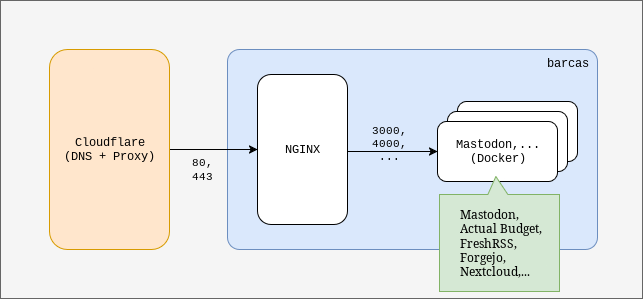
“Barcas” is the name of my server.
Unlike my other services, XMPP uses more TCP and UDP ports than 80 and 443: 5000, 5222, 5269, etc. In the case of Snikket, as many or all other alternatives might as well, ports 80 and 443 are also used to provide a web control panel and to manage users and chat rooms.
In principle, the easiest configuration for installing Snikket would be as follows:
- Configure ports 80 and 443 in NGINX to be able to use Snikket’s user and conversation control panel.
- Configure direct access to all other Snikket ports: 5222, 5269, etc. Here is the complete list. As they are not shared amongst other services, reverse-proxying them is not needed.
- Configure the DNS for my XMPP service with my domain provider, which is Cloudflare.
This configuration, which would look good at first glance, looks like the following:
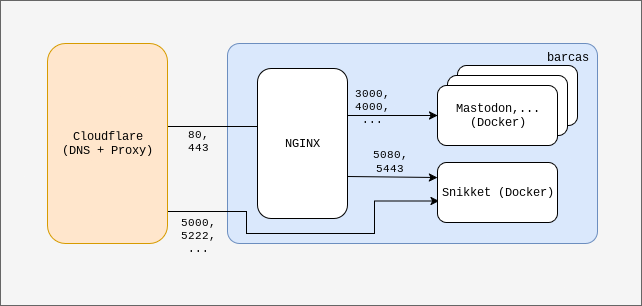
This configuration, although it seems to make sense, does not work. Cloudflare only offers proxy functions for ports 80 and 443 in its free account, so traffic from the rest of Snikket’s ports is discarded.
However, there is a problem that is not obvious, and the above configuration does not work out of the box. The Cloudflare security features that are available to free accounts in the form of “the Cloudflare proxy” only support ports 80 and 443. With the Cloudflare proxy enabled, all non-web traffic (80 and 443) was discarded, so none of the ports involved in XMPP conversations reached my server.
Disabling the Cloudflare proxy for the Snikket subdomain configuration makes everything work, and looks like this:
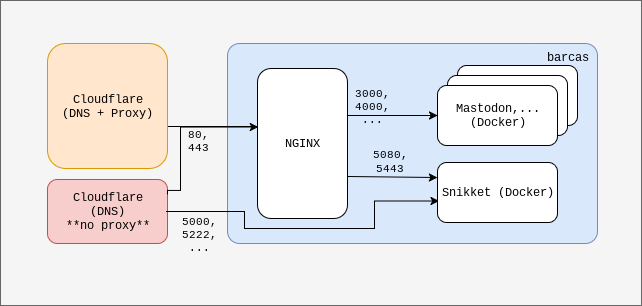
This configuration, although it works, poses a risk. By disabling the proxy function, my home IP address (where “barcas” is accessed) is exposed to the entire internet. A distributed denial-of-service attack affecting my internet service provider could leave the entire house without internet, which we don’t like.
Disabling Cloudflare’s proxy is not ideal because it exposes the server’s IP address to the rest of the internet. My server is at home, so a DDoS attack that, by pure chance, included the IP address assigned to me by my internet service provider would bring down my entire home network. That would prevent us from working or studying from home and would probably cause problems with my service provider.
An alternative to this is to hire a cheap server from any cloud hosting provider (a VPS) and move all my NGINX configuration to it, connecting this cloud server to my home server via a VPN (the free Tailscale account works very well and is more than enough).
- The cloud hosting provider would protect my server because the exposed IP would be theirs, not my home’s, and these types of companies protect their infrastructure from attacks, at least at the network level. Behind the XMPP ports there is no content, just a messaging service that also encrypts traffic, so there is no problem with losing the security and anti-bot layer that Cloudflare provides for these ports.
- Connecting the VPS to my server via a VPN is perfect for this case because it hides the IP address of my home network, saving me from having to configure it in the DNS control panel and also from having to open ports on my router. In addition, for all traffic between the VPS and my server, a layer of encryption would be applied to protect it in case it was not already encrypted.
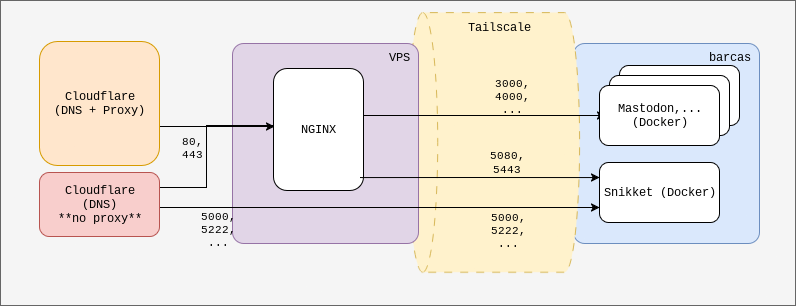
This configuration works and solves the problem of the previous configuration, but it requires finding a solution to redirect traffic from all ports other than 80 and 443 to ‘barcas’.
Why move only the NGINX configuration and not all services? For reasons of resources and price: to run NGINX and a series of firewall rules, the requirements we need are minimal. A server with 1 GB of RAM and a CPU is more than enough, and that costs between 3 and 6€ per month. If I moved everything2, I would need between 8 and 16 GB of RAM, much more storage, CPU power, a backup solution, etc. All of this would cost me around 40€ or more per month. Since I have a server at home where I can run the services, moving everything to the VPS would be an unnecessary expense in my case.
So, it seems that hiring a simple VPS to have NGINX configured there and connecting it to the home server via Tailscale would solve my problems at a very low cost (3 to 6€ per month).
The only additional complication with this method is that we need to have some mechanism to redirect traffic from the XMPP ports (several ports such as 5222, 5269, etc. on TCP and UDP) from the server we hire to our server (at home or wherever). In the end, I solved it by configuring the VPS to do IP forwarding and then setting up a series of DNAT3 rules on its firewall.
We will look at the configuration of all the elements in more detail in future posts.
-
Extensible Messaging and Presence Protocol – XMPP is a protocol that connects communities of users through their servers, creating conversations between pairs of users or rooms for group conversations. Google Talks was the most popular example of an XMPP application. One advantage of XMPP is that it is a federated protocol, meaning that even if I connect to a server where I am the only user, I can establish contact with any other user of any other service that uses XMPP on the planet. Usernames in XMPP have the same format as an email address, and servers communicate with each other when their users need them to. ↩︎
-
Although in this article I talk almost exclusively about Snikket, I have many other services on my home server: Mastodon, Castopod, a few blogs, Linkwarden, FreshRSS, Actual Budget, Forgejo, and Nextcloud. ↩︎
-
Destination NAT. Destination Network Address Translation. ↩︎